
Last updated: October 3, 2026
Sources checked: September 28, 2026.
Your map can be using a travel eSIM while an ordinary phone call still uses your home carrier. Choosing the cheaper data line does not move every activity on the phone to it.
The decision is whether to keep your home line active, not just whether to turn its data roaming off. Keeping it active preserves a route for your home number, but its calls and messages remain subject to that carrier’s rules. Turning it off removes that cellular route, with a practical cost: do not rely on receiving ordinary calls or bank SMS on a disabled line.
This guide covers an eSIM-compatible, unlocked iPhone using a separate travel data plan. It is a configuration guide, not a promise of a zero-charge bill. If you are still choosing a package, start with our Europe eSIM versus roaming-pass comparison.
Give the two lines different jobs
Label them Home and Travel so the choice is visible. Apple’s Dual SIM instructions separate the cellular-data selection from the number used for calls and messages. An existing contact can use the line last used for that contact, not necessarily the new default you just chose.
| Control | What to decide | What it does not settle |
|---|---|---|
| Cellular Data | Select Travel for the travel data package. | Which line an ordinary call uses. |
| Data Roaming on Home | Keep off when you do not intend to use home-carrier roaming data. | Voice and text charges while Home is active. |
| Data Roaming on Travel | Follow that package’s connection instructions. | The right setting for Home. |
| Home line on or off | Choose between keeping its cellular services available and disabling that route. | Whether you have another way to receive a bank’s verification code. |
Set the data route without assuming the bill is solved
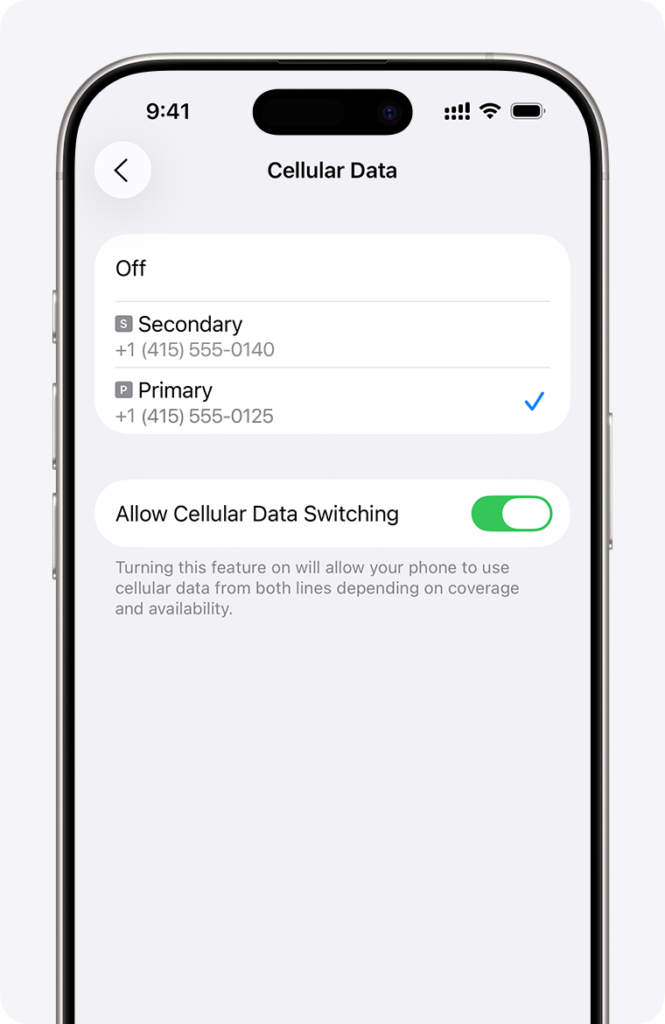
Apple’s documented path is Settings → Cellular or Mobile Data → Cellular Data, then select the travel line. With iOS 26 or later, a travel setup prompt may offer travel-only or both-lines options. Apple explicitly warns that retaining both can still incur home-line roaming fees.
For using a different carrier, check Settings → General → About → Carrier Lock. Apple identifies No SIM Restrictions as the unlocked state. Model and region support matter; installing an eSIM is not a way around a carrier lock. See Apple’s international-travel guidance.
Leave automatic data switching off when following Airalo’s travel setup instructions. There is a trade-off: Apple says cellular data may be unavailable during a call on the other, non-data line when switching is off. It is not a voice-charge blocking switch.
Why Travel may need roaming on while Home needs it off
The word roaming describes a connection setting, not whether the carrier has agreed to include the usage in your package. The correct setting is therefore line-specific.
For example, Airalo’s iOS instructions say to follow the package’s roaming setting, enter an APN only if instructed, and select a supported network if automatic connection fails. They also distinguish installation from the start of package validity: most plans start on connection in the coverage area, but exceptions can start at installation. Read the package policy before installing early.
Do not respond to a failed travel-data connection by turning on roaming for every line. Work through the Travel plan’s instructions while keeping the Home decision separate.
Scenario 1: the map is cheap, the hotel call is not necessarily cheap
Imagine a traveller with Verizon TravelPass enabled on the home line and a separate travel eSIM selected for data. Maps work through Travel. The traveller then calls the hotel from the ordinary Phone app using Home.
Verizon’s TravelPass rules say making or answering a call, sending a text or using data can start a 24-hour session in a covered destination. Selecting another data line does not change the fact that this call used Verizon. This is a carrier-specific example, not a rule for all carriers, plans or countries.
The useful pre-flight question is precise: what happens on my exact plan if I answer one call or send one SMS at this destination? Ask about Wi-Fi Calling separately. Verizon does not treat it as TravelPass usage, but calls to non-US numbers can incur international long-distance charges.
Scenario 2: keeping bank SMS means keeping a dependency
Now imagine your bank requires an SMS to your home number. Turning Home off and seeing data work on Travel does not prove the bank’s code will arrive. Internet access and a working SMS route are different checks.
Before departure, use the bank’s own settings to determine which verification methods your account supports, and test an approved alternative while you still have normal access. Do not assume that a data-only eSIM supplies a replacement phone number or that an app message is equivalent to a bank SMS.
If you retain Home for SMS, verify your plan’s receiving-text, outgoing-text and voice rules separately. Verizon’s international service guidance notes that calls and messages can remain available on most devices with cellular data off. Disabling data alone is therefore not an all-services block.
What to check before leaving Wi-Fi
- Device: compatible hardware, no carrier restriction preventing the second plan, and the travel profile installed according to its instructions.
- Data: Travel selected, its required connection settings applied, and a known package validity start.
- Home: a deliberate on/off choice, with the call and SMS consequences understood.
- Accounts: a tested way into essential services if Home is unavailable. Never publish or share recovery codes as part of a travel checklist.
Once connected, open an ordinary web page with Wi-Fi off to check that mobile data works. That is a connectivity check, not proof of which charges will appear: review the selected line and the provider’s usage information too. When you return, restore Home as needed and turn off an unused travel line.
How We Checked This
Checked September 28, 2026 using Apple’s support instructions, Airalo’s package-setup documentation and Verizon’s published rules. The two scenarios illustrate those rules; they are not accounts of our own trips or billing tests. Apple’s inline image is its documentation illustration, not a capture from a phone we tested.